SurveyJS v3.2.5
Released: November 11, 2026
SurveyJS v3.2.5 introduces redesigned tooltips, an option to require a positive answer to Boolean questions, custom dropdown loading indicators, placeholder titles for empty Dynamic Panel entries, and expression banners in Survey Creator. It also includes bug fixes and minor enhancements.
New Tooltip Design
SurveyJS action buttons now use a consistent tooltip design in place of native browser tooltips. Tooltips inherit the active theme's colors and typography, have rounded corners, and wrap longer text automatically.
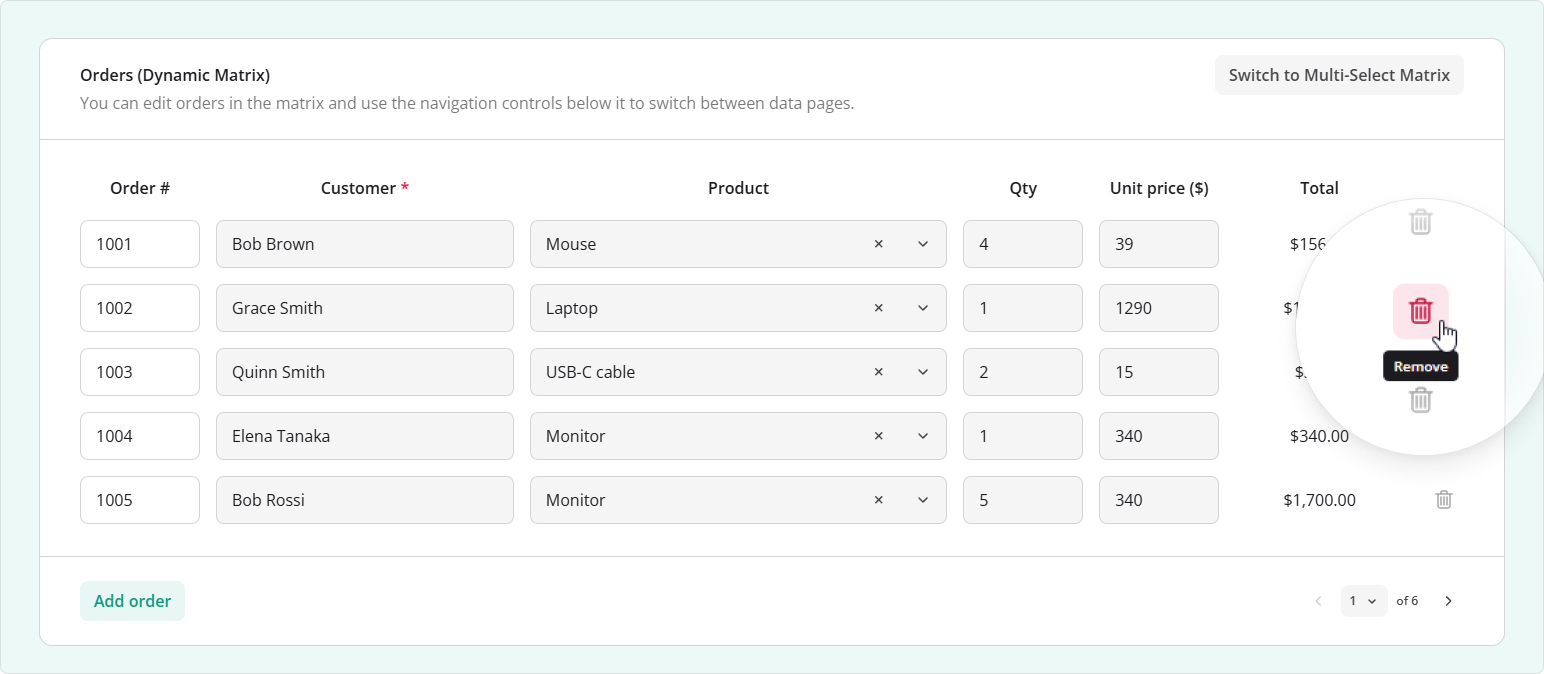
Tooltips appear when users hover over a button or focus it with the keyboard. They adjust their position to stay within the viewport and can be dismissed with Esc. The design applies automatically to built-in action tooltips in all supported frameworks.
Require Agreement in Boolean Questions
Boolean questions can now require a positive answer, making it easier to collect agreement to terms and conditions or an acknowledgment. Enable the new requireTrue property to reject both negative and empty answers. The question stores true for a positive answer unless you specify a custom value with valueTrue.
Use requireTrueErrorText to customize the validation message:
{
  "elements": [
    {
      "type": "boolean",
      "name": "consent",
      "title": "I agree to the terms and conditions.",
      "requireTrue": true,
      "requireTrueErrorText": "You must agree to the terms and conditions to continue."
    }
  ]
}
This validation works independently of
isRequiredandrequiredIf. You do not need to enableisRequiredas well.
Dropdowns: Loading Indicator Template
Single-Select Dropdown and Multi-Select Dropdown (Tag Box) questions now support custom loading components. Replace the default spinner with a custom message or indicator shown while an empty dropdown loads choices on demand.
Register a component for your framework, then assign its registered name to the survey's dropdownLoadingComponent property:
survey.dropdownLoadingComponent = "custom-loading";
The setting applies to dropdown lists throughout the survey, including questions inside Dynamic Panels and matrix cells.
Set
dropdownLoadingComponentin JavaScript on the survey instance. It cannot be specified in the survey JSON schema.
The examples below register a component named custom-loading. It receives a ListModel instance through its model property and needs to be registered before the survey is rendered.
React
import { ReactElementFactory } from "survey-react-ui";

ReactElementFactory.Instance.registerElement("custom-loading", ({ model }) => (
  <div className={model.cssClasses.emptyContainer} role="status">
    Loading choices...
  </div>
));
Angular
Create a standalone component in custom-loading.component.ts:
import { Component, Input } from "@angular/core";
import { ListModel } from "survey-core";
import { AngularComponentFactory, BaseAngular } from "survey-angular-ui";

@Component({
  selector: "app-custom-loading",
  standalone: true,
  template: `
    <div [class]="model.cssClasses.emptyContainer" role="status">
      Loading choices...
    </div>
  `
})
export class CustomLoadingComponent extends BaseAngular<ListModel> {
  @Input() model!: ListModel;

  getModel(): ListModel {
    return this.model;
  }
}

AngularComponentFactory.Instance.registerComponent(
  "custom-loading", CustomLoadingComponent
);
Import the component file during application initialization to run its registration code:
import "./custom-loading.component";
Vue 3
Create CustomLoading.vue:
<script setup lang="ts">
import type { ListModel } from "survey-core";

defineProps<{ model: ListModel }>();
</script>

<template>
  <div :class="model.cssClasses.emptyContainer" role="status">
    Loading choices...
  </div>
</template>
Register the component with SurveyJS:
import { ComponentFactory } from "survey-vue3-ui";
import CustomLoading from "./CustomLoading.vue";

ComponentFactory.Instance.registerComponent("custom-loading", CustomLoading);
HTML/CSS/JavaScript
import { createElement, ReactElementFactory } from "survey-js-ui";

ReactElementFactory.Instance.registerElement("custom-loading", ({ model }) =>
  createElement(
    "div",
    { className: model.cssClasses.emptyContainer, role: "status" },
    "Loading choices..."
  )
);
The loading template applies only to choices loaded on demand. Set the question's choicesLazyLoadEnabled property to true and handle the survey's onChoicesLazyLoad event to fetch the choices.
Demo: Lazy Loading in Dropdowns
Dynamic Panel: Placeholder Titles for Empty Entries
Use the new templateTitlePlaceholder property to display a fallback title when a Dynamic Panel entry's templateTitle resolves to an empty value. This keeps entries identifiable when their titles depend on unanswered questions.
The setting applies when displayMode is "list" (the default) and entries can be expanded and collapsed using panelsState. The following example uses the contact's name as the entry title and displays New contact until a name is entered:
{
  "elements": [
    {
      "type": "paneldynamic",
      "name": "contacts",
      "title": "Contacts",
      "panelCount": 1,
      "panelsState": "collapsed",
      "templateTitle": "{panel.fullName}",
      "templateTitlePlaceholder": "New contact",
      "templateElements": [
        {
          "type": "text",
          "name": "fullName",
          "title": "Full name"
        }
      ]
    }
  ]
}
The placeholder is displayed again if the name is cleared. You can include {panelIndex} in the placeholder to number entries starting at 1, for example, "Contact {panelIndex}". The default placeholder is "Panel {panelIndex}" and follows the survey locale.
[Survey Creator] Expression Banners on the Design Surface
Form authors can now review an Expression question's calculation directly on the design surface. A banner displays its expression, updates when the expression changes, and shows No expression set when the expression is empty.
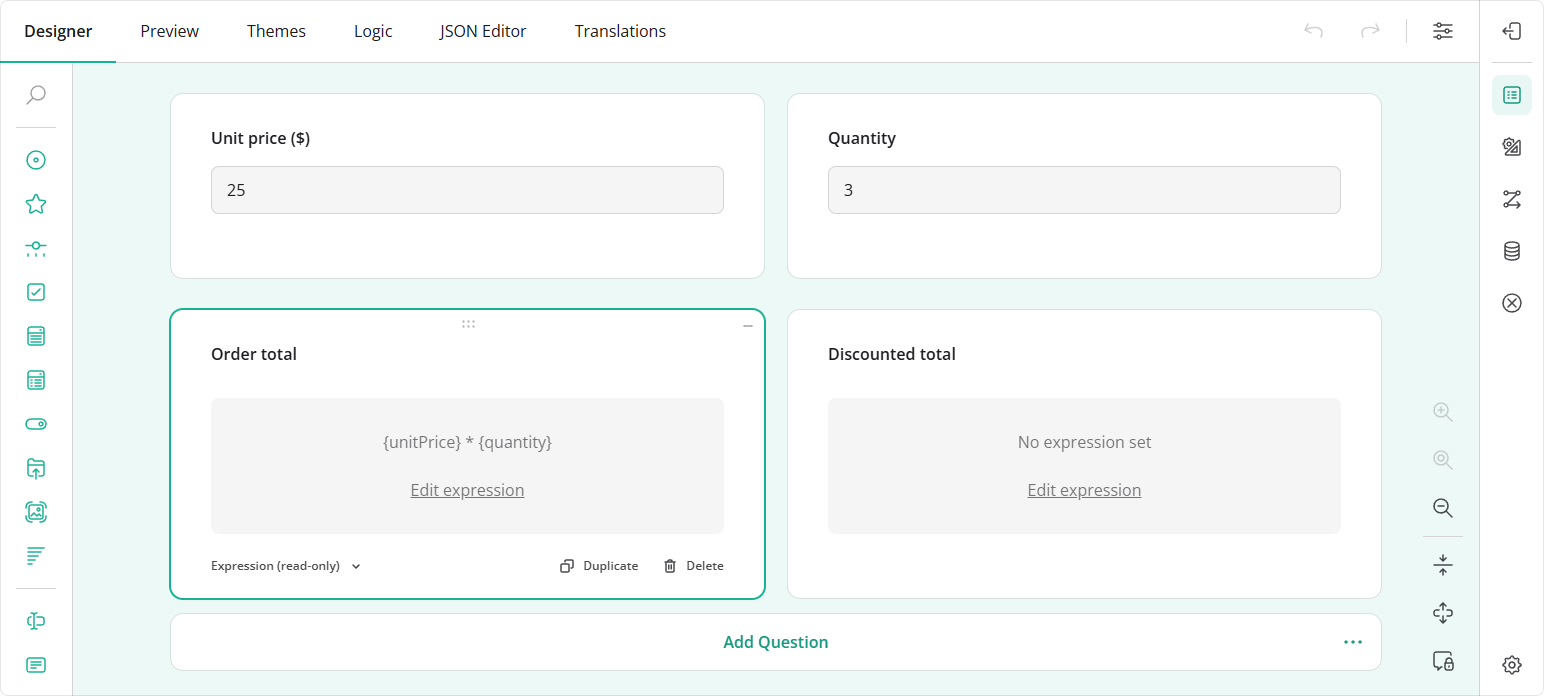
Click Edit expression to select the question and focus its expression editor in the Property Grid. The link appears only when the expression can be edited. Long expressions are shortened in the banner—use the editor to view or change the full expression.
Bug Fixes and Minor Enhancements
Form Library
- Dynamic Panel: "Remove" button is incorrectly aligned when placed to the right of the panel content (#11772)
- [React] Reduce root Virtual DOM rerenders by splitting it into smaller reactive components (#12112)
clear()doesn't clear validation errors inSurveyModel(#12214)- [Vue 3] Inline form
onsubmit="return false;"violates CSPscript-src-attr 'none'(#12220) - Image Picker: "No image" placeholder persists after a failed image's
imageLinkis updated to a valid URL (#12244) - Checkboxes: "Other" choice is not recognized when
valuePropertyNameis set to"Other"and no regular choices are visible (#12245) choicesFromQuestionin"selected"mode: Copied "Other" choice displays the entered text but retains the default "Other" display value (#12246)choicesFromQuestionin"selected"mode:setValueIfcauses a stack overflow whenshowOtherItemis enabled and the assigned value is not among the copied choices (#12247)- Survey in question-per-page mode gets stuck on the first question when a start page is specified (#12271)
- Missing semicolon in
survey-core.cssandsurvey-core.min.cssbreaks two CSS variables (#12273) - [Vue 3] Progress bar doesn't reflect changes in answered question count when a value is set in
onAfterRenderPage(#12285) - Calculated value doesn't recalculate when a matrix row becomes visible (#12284)
- Skip trigger doesn't retry navigation to a question after a previous attempt failed because the question was hidden (#12283)
Survey Creator
- Dropdown popup is incorrectly constrained to the input width when the question title is on the left (#8122)
- shadcn/ui Theme Adapter: Dropdown is rendered incorrectly on the design surface (#8149)
- Changing a matrix column's cell type unexpectedly scrolls the design surface to the first question (#8140)
- Property Grid: "Show the Clear button" control is incorrectly positioned (#8143)
How to Update SurveyJS Libraries in Your Application
To update your application to SurveyJS v3.2.5, install the packages you use or replace your existing script and stylesheet links with the versioned links below:
Angular
npm i survey-core@3.2.5 survey-angular-ui@3.2.5
npm i survey-creator-core@3.2.5 survey-creator-angular@3.2.5
npm i survey-analytics@3.2.5
npm i survey-pdf@3.2.5
React
npm i survey-core@3.2.5 survey-react-ui@3.2.5
npm i survey-creator-core@3.2.5 survey-creator-react@3.2.5
npm i survey-analytics@3.2.5
npm i survey-pdf@3.2.5
Vue.js
npm i survey-core@3.2.5 survey-vue3-ui@3.2.5
npm i survey-creator-core@3.2.5 survey-creator-vue@3.2.5
npm i survey-analytics@3.2.5
npm i survey-pdf@3.2.5
HTML/CSS/JavaScript
<link href="https://unpkg.com/survey-core@3.2.5/survey-core.min.css" type="text/css" rel="stylesheet">
<script type="text/javascript" src="https://unpkg.com/survey-core@3.2.5/survey.core.min.js"></script>
<script type="text/javascript" src="https://unpkg.com/survey-js-ui@3.2.5/survey-js-ui.min.js"></script>

<script src="https://unpkg.com/survey-core@3.2.5/themes/index.min.js"></script>

<link href="https://unpkg.com/survey-creator-core@3.2.5/survey-creator-core.min.css" type="text/css" rel="stylesheet">
<script src="https://unpkg.com/survey-creator-core@3.2.5/survey-creator-core.min.js"></script>
<script src="https://unpkg.com/survey-creator-js@3.2.5/survey-creator-js.min.js"></script>

<link href="https://unpkg.com/survey-analytics@3.2.5/survey.analytics.min.css" rel="stylesheet">
<script src="https://unpkg.com/survey-analytics@3.2.5/survey.analytics.min.js"></script>

<link href="https://unpkg.com/survey-analytics@3.2.5/survey.analytics.tabulator.min.css" rel="stylesheet">
<script src="https://unpkg.com/survey-analytics@3.2.5/survey.analytics.tabulator.min.js"></script>

<script src="https://unpkg.com/survey-pdf@3.2.5/survey.pdf.min.js"></script>
<script src="https://unpkg.com/survey-pdf@3.2.5/pdf-form-filler.min.js"></script>
If you are upgrading from v2.x, review the breaking changes introduced in SurveyJS v3.0 and subsequent updates.